When do you get this error ?
When you try to connect to the network on windows Vista or windows 7 computer, some times you get the error “press the configuration button on your access point or router“.
This is a type of security. Some routers use the configuration button to synchronize the wireless . For example Linksys router has a small Secure Easy set up button on the router. If you press it and hold it down, it will create a secured network with WPA security key. Now on your computer should be compatible with the Secured Easy set up. If it is then you just need to click on the SES on your computer and it will connect to that network automatically.
Huh! …Difficult!
Follow these steps Fix the error “Press the configuration button on your access point” ?
The Operating system on the computer is Windows Vista / 7
Click Start.
Go to Control Panel.
Go to Network and Internet.
Go to Network and sharing center.
On the network and sharing enter window you will see ” Connect to a network ” .
Click on it .
You will see your wireless network in the list.
Click on your network and click connect .
If your network is secured then it will ask you for the password or the network key.
Type the correct network key and click connect. It will connect you.
Sometimes when you try to connect to the network it will give you the message ” press the configuration button on your access point …” or Enter the PIN number . In that case, on the same window, at the bottom you will find the option, I don’t want to configure, I want to enter the key manually or I just want to connect. click on that option and it will go to the next step.
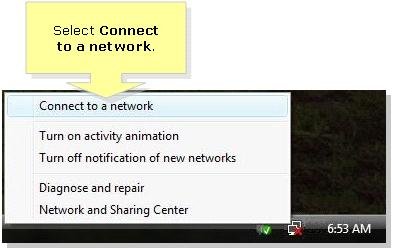
Easy steps to connect to the wireless network:
If you don’t know the password then you will need to open the set up page of the router and check the wireless settings.
Easy setup guide is designed to work with Linksys wireless router , Netgear wireless router, D Link wireless router and all other brands of routers.
Fix Home Network
I am trying to connect my netbook to the Internet. I already have my other 2 Sony laptops connected and working just fine. This is my son’s netbook that I am trying to connect. I have windows vista on it. I keep getting error message ‘ Press the configuration button on your access point. ‘ I am not sure what to do?
I just reformatted my old Vista laptop and now it says press the configuration button on your access point when I try to connect. It was working before and now I don’t know why am I getting this message.
I was trying to connect my windows vista computer and got the same error message….
i have the same problem as most here, i always get an error message saying press the config button on the accsess point but i havent a clue what that means and when i try and enter my scurity key it dosent work it just says cannot connect to the wifi, I hope some one here can help
I am not able to connect to wifi. I have Linksys WRT120N router. When I try to connect to the SSID It gives me the same message.
I have D link router and when I try to connect to the wifi on my new laptop. I get the same error. How to avoid this.
I have Linksys E2000 router and when I want to connect my laptop to the SSID, it is asking me to press the configuration button on my access point. What should I do?
I have a new Linksys E1000 router. When I try to connect to the wifi it says press the configuration button on the access point. What is this ?
hi all ! I was wondering ” Where is the configuration button on the access point ?” There is no need to press any configuration button on the access point. In fact there is no access point in my network. Thanks for your help !
Where is this configuration on my access point. I do not have any access point. I have Linksys wireless router only. Help me to connect
I had a lot of problems while connecting on my laptop. First I was not able to see my wireless SSID. When I got to see the SSID, I got the same error message. I followed your instructions and connected to the network. I was able to access the Internet for 2 days. After 2 days I got another error of additional log on information… I again followed your steps and got connected. Now it is working fine. I have very old router. I am planning to upgrade the firmware of my router. I hope it will work properly. Thanks for your email support
Thanks for your help. I got it connected. no more need to press configuration button on the access point.
If you don’t know the security key then you will need to check the settings of the router. If you have any computer connected to the router, then open the set up page and check the settings. If your SSID is not secured then it will not ask you for the security key and it will connect you to the network. But if it is secured then you will need to enter the security key.
Thanks for your Guide and free email support
I got rid of the error press the configuration button on the access point.
I also used the guide to connect my play station.
I am getting the same error about press the configuration button on the access point.
How can I connect ?