What is 192.168.1.1 ?
192.168.1.1 is the Default IP address of almost all the models of Linksys and some other routers. We will discuss about how to open the setup page of the router using its IP address. We can use the setup page of the router to make different changes to wireless or Internet connection settings.
Each and every device in your network has it’s own unique IP address. Suppose you are at home. You have 4 – 5 computer ( desktops and laptops) and printer , and other networking devices. Now in order to work in the network, all these devices need and address so that they can talk to each other and also go on line.
Router is device which will assign IP addresses to all the devices in the network. So that means all your computers and devices are getting IP address from the Router. This is very important device in your network.
If you have modem, then you can go on line on only one computer. Because modem can provide only one IP address. But if you want to go on line on more than one computer at a time then you will need a router.
This router also uses IP address. Generally For Linksys router the IP address is 192.168.1.1.
It is not necessary that all the routers should have the same IP address of 192.168.1.1. It depends on the manufacturer . Some of Linksys Voice over router uses IP address 192.168.15.1. Basically, it depends on the manufacturer.
Follow the Steps to open the router setup page:
Step 1: Open the command prompt on your computer.
Click Start .
Now just above the start button, you will see start search box.
In this box type cmd and hit enter on your keyboard.
You will see the command prompt ( a black window) .
OR
Press the Windows key on your keyboard and press “R” on your key board. It will open the Run box.
In the Run box type cmd and hit OK. You will see the command prompt.
Windows key is at the bottom, in between Ctrl and Alt keys.
OR
Click Start.
Go to Programs or All programs.
Go to Accessories.
You will see Command prompt. click on it and it will open the command prompt.
Step 2 : Check the IP address of your computer.
You have already opened the command prompt.
In the command prompt type ipconfig and hit enter on your key board.
Now you will see a lot of information.
Search for the IPv4 IP address and IPv4 default gateway.
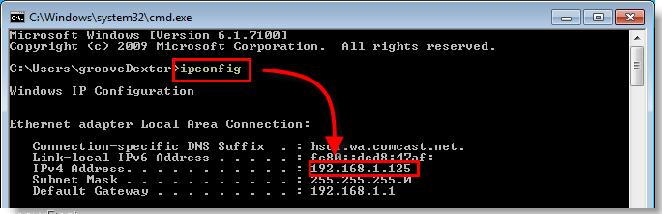
If computer is hard wired to the router then you will see the IPv4 address under Ethernet adapter Local area connection.
If the computer is wireless then you will see the IPv4 address under wireless network connection.
Note down the IP address and default gateway number.
Default gateway is the IP address of your router.
Open the 192.168.1.1 Setup page of the router:
If you want to open the set up page then you can open the Internet browser and type the number 192.168.1.1. and see if it ask you for the user name and password. This will be the user name and password to access the router set up. Every router has user name and password. So if you want to access the Linksys settings page then type 192.168.1.1 in the address bar of the Internet browser and hit go.
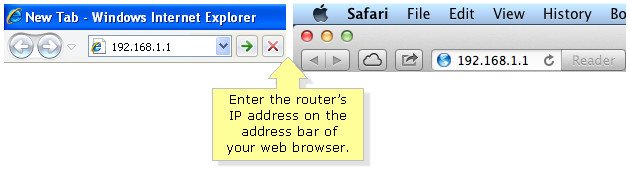
It will ask you for the user name and password. This will be the user name and password of your router. The default user name and password of the Linksys router is “admin”
Then you will see the basic setup page the router.
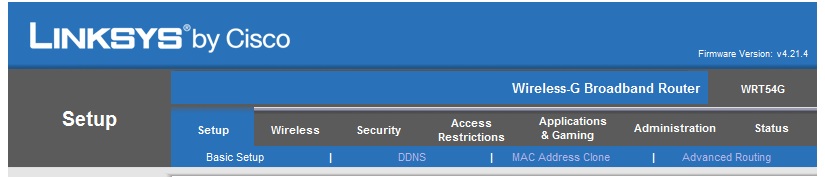
The set up page of the router is the page where you can check or change the settings . If you want to check the wireless settings of the network then you can open the set up page and check the settings. In order to change the network name or password, you can open the set up page and change it.
If you are still now able to open the page then follow the easy steps of the Fix home Network’s Easy setup Guide and fix your router problems
In short, 192.168.1.1 is a private IP address and generally it is the default IP address of almost all the models of Linksys router. Easy setup guide is designed to work with Linksys , Netgear , D Link wireless router and all other brands of routers.
How can I get the admin password for my router? I have linksys WRT1200AC wireless router. 2 computers are connected to the wireless network already. Trying to connect a new laptop to the wireless. Tried to open the 192.168.1.1 setup page but not opening. Please help.
My PW is on a sticker on side of router.
I was trying to open the setup page of my EA4500 using the same number 192.168.1.1 but I don’t know some how the IP address was changed to 192.168.0.1. I am using DSL internet connection. May be that could be the reason.
Can not change the settings on the router. I have E4200 and want to change the wireless security key. I have not installed the Cisco connect software. I can not open the setup page when I enter 192.168.1.1. It goes to my modem page.
Trying to open the setup page but not accepting the password. I can ping the number and also able to access the Internet. I want to change the wireless network key and that is why I want to open the set up . I will lose all the settings if I reset it which I don’t want.
can not open the set up page. I tried to reset manu times. The IP address on computer shows 192.168.0.1 and no default gateway. I have E4200 and want to open ports for xbox
Finally I was able to open the setup of my Linksys E3000. I had to reset it many times because the password was not accepted.
192.168.1.1 how to set up a wireless network. I have been trying to open the setup page. I have Linksys WRt120N and DSL Internet connection. Whenever I type that number, it opens the modem setup page. Then How can I access the setup page?
Not able to open 192.168.1.1. My PC is connected with the Ethernet cable. The IP address on my PC shows 192.168.0.1 and there is no default gateway number. How can I access this page.
I was trying to setup Linksys wireless WRT160N using CD. which did not find the WRT160N and got error message. Now I am trying to open set up page using the IP 192.168.1.1 which is not working either. The Local area connection says connected but does not show any IP associated. I tried to reset Linksys box and tried another computer also. What can I do now? Help me..
I have D link DIR600. Is this IP valid for D link or there is another number ?
I am trying to access the settings of DIR600 using 192.168.1.1 set up page. but it is asking me for the login password. what will be the password for the DIR600 ?
Cisco E1000 connecting thru 2Wire ATT DSL modem. I have a signal to ES1000 but won’t let me get on the internet. I can get on the 192.168.1.1 admin page … all seems fine until I try to surf the net. I added E1000 as my MAC BOOK Pro keeps losing the connection with the 2Wire…several forums suggested the E1000 as a good fix. HELP PLEASE. I’m thinking I need to change the IP address, but I have not idea how to do that or what to change it to. THANK YOU
connect the computer with the Ethernet cable and check the Ip address. The default gateway will be the IP address of the router. Use that number to open the configuration page.
I have Linksys E1000. But when I try to access the page the number 192.168.1.1, it is not working. It opens up modem page. I have DSL connection. How can I change the settings on my E1000. I did not install my Linksys E1000 using Cisco connect. One of my friend helped me to install it.
i was trying to secure my wireless but I was not able to access the settings page. I had to reset the router and reconfigure it to make it working. I also upgraded the firmware.
Just want to say what a great blog you got here!
I’ve been around for quite a lot of time, but finally decided to show my appreciation of your work!
Thumbs up, and keep it going!
Cheers
Christian,
I want to change the IP address of my wireless network. My gateway is currently 192.168.1.1. MY internet provider suggested me to change it to 192.168.5.1. I have DSL connection and they said that my modem is also working like a modem. How can I change the IP address of my router. I have Linksys BEFW11S4.
First let me know where is the second device connected to the first one ? The cable coming out from the first is connected to the second on which port Internet or Ethernet ? If it is connected to the Internet port on the second one then the IP address of second device must be changed. connect the computer to the second one and check the IP address of the second router.
If the cable is connected to Ethernet port then the DHCP on your router must be turned OFF. In this case you will need to reset and reconfigure it.
Hi Jim !
It is working now.
I changed the IP address of my second gateway to 192.168.2.1. The first one is working with 192.168.1.1. My wireless network is also secured.
Thanks for your help.
The guide is very easy.