Linksys E1000 Cisco connect software
Cisco has launched new software for its new Linksys E series and Cisco Valet routers such as Linksys E1000, E2000, E3000, E4200 which is also known as Cisco connect software. Cisco connect software will make your network setup very easy. It can transform anyone into networking expert and it will make Linksys router setup easy and comfortable.
This software has unique features of Guest network access and Parental control.
Linksys E series router has only 90 days of free technical support. If your router is more than 90 days old then you will not get free technical support.
You can setup this router on your own. And you just need some simple steps.
You can use the Cisco connect software for the initial Linksys router setup as well as to monitor the network.
Linksys E1000 Router setup using Cisco connect software:
If you are running the software for the first time it will ask you to connect the modem to the router. But will not ask you to connect the computer to the router. However it will be better if you connect the computer to the router with an Ethernet cable. Otherwise it will not find the router and you will get the error “we did not find your router”.
Run the program and at the end it will connect you to the Internet. You don’t need to do anything. The software will do all the settings on its own. It will also create the new wireless network with the unique name and password. Your wireless network name will be fully name like the name of fruit or animal with color for example white monkey or anything else. You will get all the wireless settings at the end of the installation. You can later change the SSID and the security key.
It is recommended that you should change the basic wireless settings using the Cisco connect software and not the router web based utility. If you change the security settings using web based utility then the software will no longer work. Also the Cisco connect software is not compatible with WEP security settings.
If you do not have the installation software then you can download Cisco connect software from Linksys website. Make sure to select proper model number.
Linksys E1000 setup without Cisco connect software:
You can setup Linksys E1000 router without the Cisco connect software also. You just need to open the Linksys router setup page and change the settings manually. Setup page is the page where you can change the settings of the router manually.
Linksys E1000 manual setup is very easy.
Connect the main computer to the Ethernet port and modem to the Internet port. Check the light status. You will 4 lights turned on.
Make sure that you are connecting the computer to one of the Ethernet ports on the router and not to the Internet port. The modem should be connected to the Internet port. If you connect the computer to the Internet port on the router, then it will not get IP address from the router and you will not be able to configure it.
The default IP address of Linksys E1000 is 192.168.1.1. Open the Internet browser and in the address bar type 192.168.1.1 which will open the Linksys router setup page.
Change the Internet connection settings so that your main computer will be able to access the Internet. If you are using Cable Internet service then you will need to clone the MAC address of the main computer. If you are using DSL Internet service then you will have to change the PPPoE settings.
Get access to Fix Home Network’s Easy setup Guide and start fixing Linksys E1000 manually.
Once your main computer is able to access Internet, create a new wireless network for your wifi devices. Connect all your wireless computers and devices to the new wireless network.
Read how to connect to wireless network on Windows or MAC computers.
You will not be able to use Cisco guest network access without Cisco connect software.
You can setup your Linksys E1000 router without connecting the computer with an Ethernet cable. Reset it to the factory default settings. Now, search for the wireless network on your wireless computer. You will see your wireless network name as “ciscoABCDE “where A, B, C, D, E will be the last 5 digits of the serial number on your router. Check the last 5 digits of the serial number serial number at the bottom of your router. Connect to that wireless network. The default password for that network will be “password “. Once you connect to the wireless network, you can set up your router. Again you can run the CD.
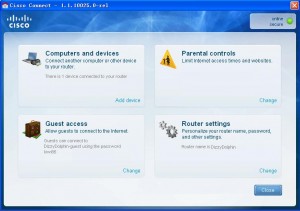
Once you install the Cisco connect software, you will find this software under all programs on your windows computer. When you open the software, you will get 4 options there.
- Computer and Devices. You can create Easy setup key to connect other computer to the wireless network easily.
- Parental control: you can restrict the Internet access for a particular tile. Click here
- Guest access settings: Here you can manage your guest access settings. Click here
- Advanced settings: You can change the name of the network or security settings. Also you can open the router setup page.
What is Linksys E1000 default password?
If you reset the router to factory default settings then the Linksys E1000 default password will be admin. But if you ran the CD and installed the Cisco connect software then your wireless network key will be the password to access the Linksys E1000 setup page. You can use the same network key to access the router setup page.
What is Cisco connect guest password ?
To find the Cisco connect guest password, you will need to open the cisco connect software. You can not install guest network without installing cisco software. Open Cisco connect software and go Guest network settings. There you will find the cisco connect guest password.
If you are facing connection dropping issues then I will suggest you to upgrade the firmware. Download the latest firmware from Linksys website and upgrade it. After upgrading the firmware, reset the router and reconfigure it from the start.
Use Fix Home Network’s Easy setup guide for Linksys router setup. This guide will help you setup and troubleshoot your Linksys E1000 router without Cisco connect software.
Linksys E1000 Cisco connect software is not working.
I tried installing it manually and it did work But I want cisco connect software installed on the main computer so that I do not need to open the setup and change the settings manually.
I am having hard time setting up my E1000.
I can connect the computer directly to the modem and it works well. I have verizon DSL. When I connect the modem to the router and computer to the Ethernet port, it does not work. I tried changing the LAN IP address of E1000 and also tried PPPoE setting but nothing works. I did it manually as well as using Cisco connect software.
Cisco connect guest network is not working. I had been trying to get my friend’s laptop on the guest network but he can not access Internet when connected to Guest but it works on main wireless. It seems that guest is working. I have installed the software and all the other computers and other devices are working.
I just bough E1000 from one of my friends. he was using it for more than a year. I installed it without any problem (using Cisco software). Got my one wired and 1 wireless laptop online. Only problem is with the Guest access. I tried to get on the Internet with this Guest network but no luck. My laptop is not getting IP address when connected to the guest. My friend also tried but he was also not getting Internet. What IP address can I assign manually? Will that work? Firmware is already upgraded.
I can not access Internet through the router. When I connect the computer to the modem, it works. But if I connect it through the router, it does not work. I tried to run Cisco connect software but that also fails and says router not found. If I reset the router, I will lose all the network settings which were installed before. How can I get it working.
The guest network password is not working. I am trying to connect to the guest network. I can join the guest access and it asks me for the guest password also but when I type the number, I can not get on the Internet. I know the security code is correct.
Looking for guest network password. I am trying to connect my friends laptop to access the Internet. He can see my unsecured guest connection and he can join also. But when he tries to open the Internet browser, it requires guest password. I entered the correct guest password which I think is, but still it is not working.
I am really very happy to get my e1000 router up and running. I had lot of issues with the setup. Also the manual was not useful at all. I was not even able to open the settings page using the manual. Thanks for your guide. I upgraded the firmware and also reconfigured it manually. It was a very good experience for me.
Thanks for the help. Your guide is very helpful for Linksys E1000 manual setup. I was able to reinstall it without cisco connect software. Actually I pressed the reset button on the router to find Linksys E1000 default password. I tried to run installation CD but that did not help me cisco connect guest password setup. Finally I just changed the settings manually.
What is Linksys E1000 default password?
I installed the router using the software and I can not find the option to open the software program on my main computer. How can I check the password?
Or do I need to reset it and re-install ?
Where can I find the Linksys E1000 manual setup. I am trying to reconfigure it with the new Internet connection and I do not have CD.
The Linksys E1000 default password is admin. But if you have used CD to setup then default password must be different. You can open the software and check the password settings. Same information is given in Linksys E1000 manual.
What is the Linksys e1000 default password? I m trying to connect to the Internet on my laptop but not sure about the default password. I need help.
I tried Linksys E1000 setup with the help of Cisco software. Everything is working properly but I can not get my friend’s laptop to the Guest wi-fi. It says connected to the Guest SSID but can not access Internet.
Where do I find e1000 manual ? I tried to run the CD but it is not working and I can not setup E1000 guest password. Looking for the manual so that I can change the settings manually.
I was trying Linksys E1000 setup using software CD. The software did not help me setup my wireless router. That is why I opened the E1000 setup page and changed the settings manually. Now I can access Internet on all my laptops but without guest network access. There is no option to change the settings for Guest password using web interface of E1000. Is there a proper Linksys E1000 manual ?
Where can I find guest password and the Linksys E1000 default password ? I don’t know the password to access the settings of my E1000. What if I reset E1000? Will I lose all the settings. I have 1 desktop and 2 wireless laptops and a play station. If I reset then I need to reconfigure it. I do not have my CD with me. What should I do? Help please…
I need the guest network password but i don’t it can u help me out. the connection is great at my location but i don’t know how to obtain the guest access password .
Ok i have the Linksys E1000 router and when i set it up it asked me for a guest password? I’m clueless. And it would also help if u could tell me how to get my play station 3 online using the router. THX
What is Linksys E1000 default password? I tried all the passwords that I thought it could be, but none of them worked. I think I should reset my Linksys E1000 and reinstall it.