Linksys WRT160N router setup without CD
The Linksys WRT160N router setup is very easy and you can do it manually. Free technical support for Linksys WRT160N is for only one year. You don’t even need to run the installation disc. If your WRT160N is more than 1 year old then it is Out of warranty. Out of warranty does not mean that your router is broken or it is not good any more. Of course it is still in a working condition, you just need few steps to make it working again. Linksys WRT160N setup is very easy and you can do it manually.
This is one of the N series routers that Linksys has launched. Linksys WRT160N is a cable/DSL router that means it can work with cable Internet service provider and DSL Internet service provider. Now, in the market, you will find a new E series of Linksys routers. The E1000 is nothing but Linksys WRT160N. The only difference is that E1000 comes with a special Cisco connect software.
Watch Video on Linksys WRT160N setup
Linksys WRT160N router setup without CD:
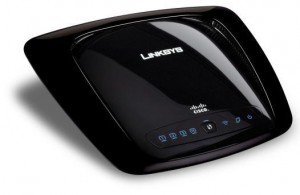
If you have CD or the installation software for Linksys router setup then you can try to run the CD and setup the network.
Let’s start with the setup process.
Step 1: check the internet connection.
If you are not able to access internet on all the devices or computers then make sure that you have internet through the modem.
Connect the main computer directly to the Internet Service provider’s modem and try to access the internet through only modem.
If it is not working directly through modem, then you must need to get in touch with your Internet service provider and get the internet fixed through modem.
Step 2: check connections to the router.
Once you are sure that internet is working properly through modem, then check the connection between modem – router and computer.
Here is the image to describe the Linksys WRT 160 N router connections.
Modem is connected to internet or WAN port on Linksys WRT 160 N router.
Computer connected to any one of the 4 local ethernet ports of the router, port 1, 2, 3, or 4.
Step 3: open the Linksys WRT 160 N setup page.
Open internet browser such as Firefox, Chrome, Safari.
In the address bar type the number 192.168.1.1
This is the default ip address of Linksys WRT 160 N wireless router.
It will ask you for username and password.
The default username would be admin.
The default Linksys WRT 160 N router password is admin.
If this default username and password is not working, then you will need to reset the router to factory default settings as explained before.
This will lead into reconfiguring it from the scratch.
Once you enter the username and password, you will be on the setup page of the router.
Step 4: Make internet connection settings.
Linksys WRT 160 N supports two types of internet services – Cable and DSL.
We will need to change the internet connection settings.
Internet connection settings for cable ISP: On the basic setup page, internet connection settings must be set to automatic configuration DHCP.
Click on Mac address clone sub tab.
Enable mac address clone and click on clone my pc’s Mac.
Click save settings at the bottom.
Now power cycle the network.
Unplug power to the router and modem. Wait for 10 seconds. First plug in the power to the modem only. Wait for 10 seconds. Now plug in the power to Linksys WRT 160 N router. Wait for 30 seconds.
Now try to access internet on the main computer which is connected the router.
Internet connection settings for DSL ISP: On the basic setup page, change internet connection settings to PPPOE.
Type in the username and password given by your internet service provider.
Click save settings at the bottom. Now try to access the internet on the main computer which is connected to the router.
Step 5: Wireless network settings.
Once your main computer is able to access the internet, then you can change the wireless settings.
Go to wireless tab. Change the wireless network name SSID. This will be the name of your wireless network. Save the settings. Click on wireless security subtab. Change the security mode to WPA personal. Enter the security password for your wireless network. This will be the password to connect to the wireless network. Click save settings.
Do not share your wireless network password.
Step 6: connect to the wireless network.
Once your wireless network is ready, try to connect to the wi-fi on the laptop or other wi-fi devices.
You will see the SSID. your wi-fi network name. Enter the network WPA key or password and connect.
Once you are able to access internet on wired and wireless computer, your Linksys WRT 160 N router is working properly.
Buy New Linksys Wireless Router
Linksys WRT160N firmware upgrade :
Many users of this model are facing problems connecting to the wireless network or slow Internet access. However if you upgrade the firmware of the router, you will get better speed and network connectivity.
There is a new Linksys WRT160N Firmware release. Firmware is the software of the router. All the bugs or deficiencies can be removed by the firmware upgrade. After upgrading the firmware it is recommended that you should reset the router to the factory default settings and reconfigure it.
See How to upgrade Linksys router firmware
What is WRT160N router default password?
This is the common question always for all the models of all the routers.
The default password of Linksys WRT160N is admin, leave the user name blank.
If the default password is not working then try some different passwords that you use most often. If nothing is working then you will need to reset the router and start from the scratch. Remember that if you reset the device, it will come back to factory defaults and you will lose all the settings.
The internet is also the first place you will go when you are planning to get technical support. There are many websites with lot of general information about Linksys router setup. But all the networks are not same. You need proper simple steps to fix your problem.
Hi, My Linksys WRT160N wireless router stopped working all of the sudden. When I connect to the internet wirelessly my laptops say I have full signal but “No Internet Access.” None of the 4 wired ports on the back of the WRT160N router give me wired internet. The only way I can get internet is to connect the wire to my internet modem.
This is surely a great help. I had been trying to get my WT160n to communicate with my new modem. This was working with the DSL modem but I recently switched over to cable. My computer was able to access Internet through the cable modem. I upgraded the firmware and made some changes that you suggested and I am getting better wireless internet too. Thanks
How do I upgrade firmware if I am not able to open the setup page?
My PC is connected with the Ethernet cable and I can access the Internet. I also have a laptop which is dropping wireless many times a day. I want to upgrade firmware but I can not access the setup page. The IP address on the computer is 192.168.1.100 and default gateway is 192.168.1.1. When I enter the number 192.168.1.1 it says can not display the webpage.
How can I connect 2 routers to each other. I have one WRT160N which is connected to the modem and want to ex[and network to the second floor. I have another wireless G router which I want to connect to the main router and use wifi on the second floor.
Trying to upgrade firmware on my olf WRT160N but can not update it. Each time I try to open the setup page, it gives me error Authentication failed. I did reset it many times but no luck yet. I have already downloaded the firmware file. Is there a way where I can upgrade firmware without opening the setup page?
I just bought an IMAC and now my internet won’t work through my router (worked fine with my PC). If I plug the cord straight from the modem to the computer it will work but if I plug the cord into the wireless router then into the computer, it won’t work. Our wireless won’t work either. Please help! I called Linksys but I refuse to play $40 for them to fix their product! SO Frustrating!@
I tried to upgrade firmware and did reset it many times. But the wifi connection on my new iPad is dropping. I have a laptop also which stays connected and I can access Internet without any problem. only the ipad is not consistent.
I think firmware upgrade can resolve many issues. I was not able to access Internet for more than 5 minutes. The connection was very intermittent. I upgraded the firmware and reinstalled the wifi and now it is working better than before.
I can not connect to the wireless network. I upgraded the firmware and reinstalled the wrt160n but still can not connect. I have 4 wireless computers. 3 are able to connect. Only one is not working. I think it might be the problem with the computer then.
I am trying to run setup CD but it is not working on my main computer. The main computer is old desktop. It is connected with the Ethernet cable but the device is not detected. I can see the Ethernet light is lit up and Local area connection says connected. Not sure how to make it working. It was working before. I pressed the reset button accidentally.
Linksys Wrt160n setup process is very easy.
Connect the main computer to the router and open the setup page to change the settings manually.
Thanks for the help. I got my network working using your steps. Fix Home Network’s Easy setup guide is very good. The steps are very simple. I got my router working and also Linksys WRT160N firmware is upgraded.
Need steps for Linksys WRT160N setup manually without CD. I bought this device from one of my friends. He was using it for years and does not have installation CD. I have a cable Internet service and want wifi at home. I have a desktop and newly bought laptop for which I need wifi. How do I change the setup settings manually. Is it necessary to upgrade the firmware?
I am trying to change the settings manually but I can not access the settings page.
My computer is connected with the Ethernet cable and I can see Ethernet light is lit up solid. I am able to ping the IP address 192.168.1.1 but when I try to open the settings page it says 401 unauthorized. It doesnot even ask for the password.
Is that problem with my computer or the settings page? I have only one computer and xbox and PS3.
I think I also need firmware upgrade. I have version 3 model. I can open the settings page but I can not make any changes. Nothing happens when I click on save settings. I tried to reset many times. I have downloaded the firmware but not able to upgrade it.
Where do I get instruction for Linksys Wrt160n firmware upgrade. I am not even able to open the firmware file. I tried with 2 different computers but the firmware file is not opening. Can I also get Linksys WRT160N setup CD ?
Where can I find Linksys WRT160N setup manual for wifi network setup. I do not have setup CD and also want this firmware upgrade manually.
What is the default password of WRT160N? I am trying to configure it with new ISP. I do not have CD and it is not accepting the default password to login to the setup page.
I need wrt160n firmware upgrade because the connection is intermittent and I can not even use my laptop for more than 5 minutes. The wired setup is working fine it is just the wi-fi which is having issues. Also need Linksys WRT160N setup CD.
How to get WRT160N setup without CD? I tried to open the setup page using 192.168.1.1 and 192.168.0.1 but nothing is working. My computer is connected with the Ethernet cable and not using wi-fi connection. I also tried to reset the device many times. It is not even asking for the password. I think it is not even detecting the wired computer.
I think WRT160N firmware has many issues with wifi connection. Specially version 3 has more problems. Make sure that firmware must be upgraded otherwise the wireless connection will drop. Check the website for new wrt160n firmware release . After upgrading theLinksys WRt160N firmware, reset and reconfigure it.