Linksys WRT54G setup – Easy Guide
The Linksys WRT54G setup is very easy and you can do it yourself. This old Linksys wireless G router setup is now Out of Warranty. Out of warranty does not mean that it is not working. It is still in a working condition and you just need few steps to make it working.
This article will help you:
- Troubleshoot basic network connection problems with Linksys WT54G router.
- Basic connection between modem, router and computers.
- Linksys WRT54G configuration for Cable or DSL Internet service provider.
- Setting up wireless network
- Wireless security
We will go through all the setup and troubleshooting step by step.
First of all, this is very old Linksys wireless g router. So I guess, you are not setting it up for the first time. It might have stopped working or there may be connection issues.
First of all, check the status of the power light on your router. If the power light is solid then it can be repaired. If the power light is blinking on Linksys WRT54G then you need to reset the router and reconfigure it from scratch.
Linksys WRT54G setup is one of the G technology Broadband routers which works with Cable or DSL Internet service. It has 4 Ethernet ports where you can connect 4 computers using Ethernet cable. If you want to connect more than 4 wired computers/devices in the network with the Ethernet cable then you can use a switch to increase the number of ports. You can also use up to 32 wireless computers with Linksys WRT54G.
Wrt54g is one of the most trusted and reliable routers. It works on G technology and you will get maximum wireless speed of 54 Mbps. The maximum wired speed will be 100 Mbps.
Watch Video on Linksys WRT54G router setup
Linksys WRT54G setup without CD
If you are not able to run installation CD then follow the steps for linksys wireless g router setup without CD below.
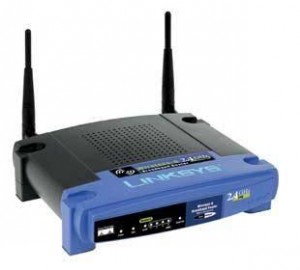
Step 1: Check the internet connection
If you are not able to access Internet on all the devices or computers, them make sure that you have Internet through modem. The internet is coming through your ISP’s modem. Connect the main computer directly to the ISP modem and try to access the Internet through only modem. if it is not working through modem then you must need to get in touch with your ISP and get the Internet fixed through modem.
If only part of your network or single device is not getting Internet then it might be setting on your Linksys WRT54G or computer which we will need to fix.
Step 2: Check connections:
Once you are sure that Internet is working properly though modem then check the connection between modem, router and computer.
Below is the image to describe the Linksys WRT54G connection.
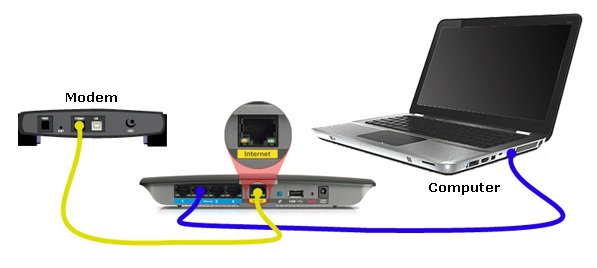
Modem connected to Internet/WAN port Linksys WRT54G router. Computer connected to LAN port of the router.
Step 3 : Open the Linksys WRT54G setup page:
On your main computer connected with the wire, open Internet browser. In the address bar, type 192.168.1.1. This is the default IP address of Linksys WRT54G wireless router.
It will ask you for user name and password.
The default user name would be admin. The default Linksys WRT54G password is admin.
If this default user name and password is not working then you will need to reset the router to factory default settings. This will lead in to re-configuring it from the scratch.
Step 4: Make internet connection settings.
Linksys WRT54G supports 2 types of internet services, Cable and DSL.
We will need to change the internet connection settings.
For Cable ISP: Change Internet connection settings to “Automatic Configuration -DHCP” and click on “Clone My PC’s MAC” Click save settings at the bottom. Now power cycle the network. ( Unplug power to the router and modem. Wait for 10 seconds. First plugin the power to the modem only. wait for 10 seconds. Now plug in the power to WRT54G. Wait for 30 seconds.) Now try to access Internet on the main computer.
For DSL ISP: Change Internet connection settings to PPPoE. Type in the user name and password given by your ISP. Click save settings at the bottom. Now try to access the Internet on the main computer.
Step 5: Wireless network settings.
Once your main computer is able to access the Internet then you can change the wireless settings.
Go to wireless tab.
Change the wireless network name and enter the security password for your wireless network. Click Save settings.
Create a new wireless network for your wifi devices. Setup unique wireless network security key. DO not share your wireless network password.
Step 6: Connect to the wireless network.
Once your wireless network is ready, try to connect to the wifi on the laptop or other wifi devices. You will see the SSID (your wifi network name). Enter the network WEP or WPA key and connect.
That’s all for the basic troubleshooting steps.
If you have any other issues, then you can get access to the free online tool which will help you guide through simple steps to fix the network issue.
Linksys Wireless G router setup:
Linksys WT54G and Linksys WRT54GS are both linksys wireless g router. They both work on G technology. The setup process for these routers is same as explained above.
Get access to Fix Home Network’s Easy setup Guide and start setting up your Linksys WRT54G router manually.
How to connect to the wireless network ?
Before connecting to the wireless network on your laptop or any other device, make sure that you have all settings of the network. You need to know the name of the network ( SSID ) and the wireless security key or password. Once you have all the settings then you can try to connect. The steps to connect will be different for different operating systems.
Click here for easy steps to connect to the wireless network
Linksys WRT54G Firmware upgrade:
Firmware is the software of the router. Linksys WRT54G version 5 and 6 need firmware upgrade. If you have trouble connecting to the wireless network or slow speed then download and upgrade the Linksys WRT54g router firmware. The firmware file for Linksys WRT54G version 1 to 4 is same. For Linksys WRT54G version 5 and 6 the firmware file is same.
See WRT54G firmware upgrade steps :
Linksys WRT54G version 1 to 7 are the routers come with 3 years of hardware warranty period and 3 years of free technical support. Version 8 has hardware warranty of 1 year with free technical support.
The internet is also the first place you will go when you are planning to get technical support. There are many websites with lot of general information about Linksys wrt54g setup. But all the networks are not same.You need proper simple steps to fix your problem.
What is the default Linksys WRT54G router password?
The default password of WRt54G router is admin, leave the user name blank. If this is not working then try your common passwords. If that is also not working then you may need to reset the device and reconfigure it. remember, if you reset the device, it will come back to factory default and you will lose all the settings.
Fix Home Network
Thousands of satisfied users !
Easy setup Guide is mainly designed for Linksys router setup without installation software. It will definitely help you fix your Linksys WRT54G setup manually. I hope, you will like it.
Linksys WRT54G router not working
My router stopped working yesterday. I suddenly had no internet connection, and I initially thought it was due to my internet provider. So I contacted them and after some tests, I connected my cable modem to the ethernet adapter of my PC, restarted the modem, and the internet connection was restored. So, the problem was in my router.
I’m trying again to connect the router (cable modem –> router —> ethernet card in my pc) but it doesn’t work.
This is surely a great help. I had been trying to get my WRT54G to communicate with my new modem. This was working with the DSL modem but I recently switched over to cable. My computer was able to access Internet through the cable modem. I upgraded the firmware and made some changes that you suggested and I am getting better wireless internet too. Thanks
How do I upgrade firmware if I am not able to open the setup page?
My PC is connected with the Ethernet cable and I can access the Internet. I also have a laptop which is dropping wireless many times a day. I want to upgrade firmware but I can not access the setup page. The IP address on the computer is 192.168.1.100 and default gateway is 192.168.1.1. When I enter the number 192.168.1.1 it says can not display the webpage.
I simply love WRT54G. Though it is older wireless G model, but it is still very stable and reliable. This is what my experience is. I never had any problem since I bought this router a long time ago. Recently it was dropping connection which I fixed by updating the software. The setup is really and anyone can setup WRT54G with the help of few simple steps.
I am having hard time connecting my iPad to the old network at home. The other wireless devices are working without any issues.
The new Ipad can see the wifi . It is a secured acces and i don’t know where to enter the security key on iPad.
Upgrade the firmware if you have any problem with the Internet connection. I did the same thing and now all the computers can access Internet without any problem. I was actually even not able to open the settings page. The user manual is not helpful though. Thanks for your support.
I am not able to save the settings. I can open the settings page but can not make any changes. My router IP address is 192.168.2.1. I changed the default IP address because my modem IP address was same as default IP adress of 192.168.1.1. I logged in with the default password. I tried Linksys wrt54g firmware upgrade also but nothing is happening. Can it be a problem with my anti virus ?
Same problem with my connection. I am not finding any other settings to change the. The connection is dropping. I did firmware upgrade 2- 3 times but there is no improvement. I don’t know what to so? I think I should go for a new N or E series model now.
Wireless connection is dropping on my all the laptops so I think it must be the problem with my Linksys WRT54G router. I tried to upgrade firmware of wrt54g but it says upgrade failed. It’s version 5 and I heard a lot of issues with this model. What can I do now?
I was trying to upgrade firmware and I think I did something wrong. Now the power light is blinking and I can not access Internet on any of my computers. I tried to reset and reinstall but now my computer is not communicating.
I want to upgrade WRT54G firmware. Where do I find the firmware on the website. Also not sure how to upgrade it. Need some information about steps to upgrade firmware. I tried to open the setup page using 192.168.1.1 but that did not work.
WRT54G wireless router is really very good . I have been using this model for last 5 years without any problem. One thing I must tell you that we must check the latest firmware on the website. Please upgrade the firmware when there is a new release on the website. Make sure while upgrading the firmware your computer must be wired to the router and not wireless.
The wireless connection is dropping intermittently . I have 1 wired dell desktop and 1 wireless HP laptop which is dropping the Internet. I did upgrade the firmware but still having the same problem. The wireless play station is also having the same issue. It is version 5.
I got my wi-fi security wep key and got connected to my SSID.
I used your Easy guide and the instructions were really simple to follow.
I also got my play station connected and working. I did upgrade the Linksys wrt54g firmware and it is working very good even if it is older model. Thanks for your support.
I was trying to upgrade the Linksys WRT54G firmware but failed 3 times. I am using version 5. I tried to reset many times. No firewalls on my computer. How can I upgrade the firmware?
I was trying to run Linksys wrt54g setup my old champ which was working before. Unfortunately my son pressed the reset button on it. i did not have CD to reconfigure it. Thanks for your great support.
I was trying to setup a secured network so that no one can connect to my SSID. In doing that I did a hard reset which caused loss of all the settings. I was not able to reconfigure it and power light started blinking. I tried to search about this on google where I found the 30-30 reset. I did that and got the power light solid but it was still not connecting to the Internet. Your technician was very helpful. He called me on my cell phone. He installed my wrt54g from the beginning and was able to setup security password. Now all my computers are working with the secured SSID. Your service is very good and also the immediate assistance is appreciated.
thanks for your help. My old WRT54G router stopped working somehow. I tried to search for the help online but nothing worked. Your technician helped me to setup my network again. He also upgraded the firmware on wrt54g
and now it is working very good.
I got a new modem from AT&T. the modem is just working fine if I connect the computer to the modem. but if I use the router nothing is working. it was working before untill I get the new modem. It is pretty old but the lights are all good.
How can I reset and reinstall it. I have one home computer and 2 notebooks.