Linksys E4200 router setup
- February 24, 2011
- by
- admin
Easy steps for Linksys E4200 setup:
Linksys E4200 router Maximum Performance Wireless-N Router lets you access the Internet via a wireless connection or through one of its four-switched Gigabit Ethernet ports. With the built-in Storage Link, you can easily add gigabytes of storage space onto your network using USB 2.0 hard drives, or plug in a USB flash disk to access your portable data files. The E4200’s built-in media server streams music, video and photos from an attached storage device to any UPnP-compatible media adapter or player. The installation process is simple, just like other Linksys router setup, open the setup page and change the settings manually.
Simultaneous dual-band Wireless-N
• USB storage port with built-in media server
• Gigabit Ethernet ports for high-speed wired devices
• Cisco Connect software for easy setup and maintenance
Linksys E4200 setup using Cisco connect software:
You can setup Linksys E4200 router using the Cisco connect software that comes with the router. Make sure that you have active Internet connection through the modem. Connect the main computer directly to the modem and make sure that you can access the Internet through the modem.
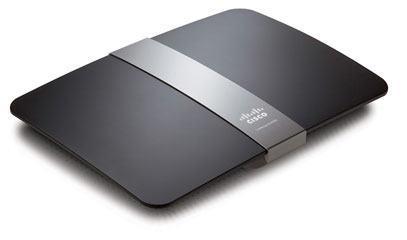 Connect the modem to the Internet port and computer to Ethernet port on Linksys E4200. Press and hold the reset button on E4200 for 30 seconds. Release the reset button and wait for 30 seconds. Power cycle the router. Now run the Cisco connect software. This software will setup your E4200 automatically. You don’t even need to change the wireless security settings. It will create 2 wireless networks. One for your main network and other one for the guest people. You can connect your own computers and devices to the main wireless network. The guest network can be used for the people who want to access the Internet only. Guest network is a virtual wireless network to access the Internet through your router. The computers connected to the guest network will be able to access the Internet only. These computers will not be able to access your main network and files and computers and printers in the main network.
The guest network is a very good feature included in Linksys E series routers.
Linksys E4200 setup without Cisco connect software:
Linksys E4200 setup is very easy. You don’t even need to run the installation CD. You can simply open the Linksys router setup page and change the settings manually.
You can also manage guest settings using the web interface of the Linksys E4200 router. So it is really not necessary to install the Cisco connect software to manage guest network as it was the case in Cisco E1000, E2000 and E3000 wireless routers. In these routers the guest network can be created and managed only using the Cisco connect software.
For E4200, Linksys has included Guest settings using web UI of the router.
The wireless connection speed using E4200 will be 300+ mbps. All the ports on E4200 router are Gigabit ports.
Get FREE access to Fix Home Network’s Easy Setup Guide and install Linkys E4200 router manually.
You can also connect your USB storage device to share within the Network.
Linksys has just introduced new Linksys E4200 router V2 Maximum Performance Dual-Band N N900 Router.
It is simultaneous Dual-Band N (2.4 & 5 GHz) where you can achieve Maximum wireless speed up to 450 + 450 Mbps.
IPv6 is Enabled.
Use it for Faster HD video streaming on tablets & TVs . The USB port can be used for shared storage as well as printers.
What is Cisco Linksys E4200 router default password?
This is a common question about all the routers. The default password of Linksys E4200 router is admin. But if you have installed your router using Cisco connect software then router password will not remain admin. It will be changed by the software. Open the Cisco software and check the ‘Router settings’ option for the password.
If you are having any difficulties with the Wireless network connection then it will be better to upgrade the firmware on your E4200. Open the setup page and go to status tab. Check the current firmware version. Download the latest firmware from Linksys website and upgrade it. After upgrading the firmware, reset the device and reconfigure it.
Use Fix Home Network’s FREE Guide for Linksys router setup without installation software. It is designed to work with almost all the models including Linksys E4200 router.
Comments are closed.
18 Comments
EsterDay
27th Aug 2012 - 5:49 amThanks for your help. I am satisfied with the service that you offered. I was not able to access Internet through E4200 but when I connected computer directly to the modem, it was working. I upgraded the firmware and changed the advanced settings that you suggested. Now it is working working better than before.
MikeAhiW3
9th May 2012 - 11:59 amThe router is very good but one of my laptop is not getting Internet when wireless. I can use this laptop in the office and other places and there is no issue. But when I try to connect to the wifi at my home, it is not working. I have another laptop and iPad at home which are connected and on the Internet. Now I am not sure if it is my laptop or the router which is causing the issue.
KarenMun8
18th Apr 2012 - 1:03 pmTrying to get iPad on the wireless network but the security key is not working. I believe I have the correct security password because my other wireless computers are connected with the same password. I don’t know why it is not working on iPad. Can I connect my iPad to the guest network? I have the guest network password also. But I never used the guest network before.
SydelleSrJ
4th Feb 2012 - 11:17 amWhere can I get manual for Linksys? I would like to change some settings on the router for security purpose. I do not want to install the cisco software because I want some advanced settings. I got it working on the wired computer but the wifi is not working. I can connect to the SSID but Internet is not working.
NicholousJR
31st Jan 2012 - 12:29 pmI can not access the setup page. I did reset my Linksys router many times. The power light is blinking when I press the reset button but still I can not access the setup page using e4200 default password admin. I want to go through manual installation. I can not even run the cisco connect software because I have older desktop.
ShrikMohR4
1st Dec 2011 - 4:46 amHow to setup E4200 wireless without CD? I have been trying to install it my DSL Internet connection and it is not connecting to the modem. When I run the Cisco connect software, it says ‘ router not found’. But it is connected properly with the cable and I can see all the lights. What shall I do now?
AmberJG4
18th Nov 2011 - 8:24 amHow can I setup my old Linksys E4200 wireless router without CD? It was working before but I think someone pressed the reset button and now I can not access the Internet when I connect the router. I tried to reset but the default password is not working. I do not setup CD with me.
AmrutKarkha2
22nd Sep 2011 - 12:29 pmI was trying to setup network at home. Just bought this model and tried to run the cisco software on my main computer. The computer is connected with Ethernet cable but the cisco software is not detecting the connection and says the device is not connected. If I connect the same computer directly to the modem, it works. Also tried to reset the device but same thing is happening.
jasonGR
19th Sep 2011 - 12:03 pmI was trying to setup wireless connection at my home. I have E4200. I am able to access the Internet on the wired desktop but the wifi laptop is not getting Internet. Also the Internet is working very slow on the wired computer. Works faster if I connect the desktop to the modem.
ChawMaw564
18th Sep 2011 - 5:16 amI have been trying to setup my External USB HD so that I can access the drive and share it among the multiple computers. I can see and access the drive on wired desktop but not on wireless sony laptop. I have 3 laptops and none of them can access the drive. Only the wired is working. All the computers are able to go on Internet.
Christine.B4632
16th Sep 2011 - 2:13 pmI have been trying to setup Linksys E4200 wireless router with the new DSL Internet connection. I can access the Internet when I connect the computer directly to the modem. I had Linksys WRT54G router before which died because of power surge. I want to upgrade to wireless N router and that is why I bought this one. But it is not working. Is there any compatibility issue with modem ?
AmarSingh12
28th Aug 2011 - 1:27 amI was trying to setup my Linksys e4200 with the new DSL Internet provider. I tried to run the CD. It is asking me for the user name and password for DSL connection. I am not sure what that means. I called my service provider. They told me that there is no such password. I am using verizon FIOS.
MichelleK
21st Jul 2011 - 1:25 pmThanks for your help. It was very good experience. The online technician was very good. I was able to understand the steps to setup my network. He was very good and patient with me. I am not technically good when it comes to computers. But thanks any ways.
AllenB
5th May 2011 - 6:22 amThe wireless connection on E4200 is dropping. I tried to upgrade the firmware but still not working. After upgrading the firmware, I did reset and reconfigure it. But still the same issue. I don’t what other settings do I need to change for a stable connection.
duwoon
15th Apr 2011 - 9:58 amI tried to connect KX MB2025 panasonic printer to E4200 via USB port but it could not find the printer via wireless. How should I do? Do I have to change security to WEP instead? Then how could I change WAP to WEP? Can anyone suggest me? Alternatively, can I change the printer to WAP figure? Don’t understand what is what and how to do all these. Thanks
AllenV
13th Apr 2011 - 7:15 amI am trying to connect my old windows Xp laptop to my new E4200 wireless. I can see the wireless SSID but it does not connect to it. What could be the problem. My new computer is connected without any problem.
Kim
12th Jul 2011 - 2:54 pmDid you figure it out yet? Well, this reply is 3 months later, but I just had a similar question and called Best Buy who went and asked their Geek Squad. Windows XP has to always keep up with all of the latest Windows updates in order for the Linksys E4200 to work with your computer. The box says it is compatible with Windows 7, but will work with XP for as long as it has the latest updates.
Paula G
25th Feb 2011 - 8:36 amI have At&T DSL internet service provider. I can access the internet when I connect the computer directly to the modem but not through the Linksys E4200 router. I tried to run the Cisco connect software but that failed. How do I setup my E4200 manually. I can not access the setup page of the router.