Linksys WET610N wireless bridge
- May 24, 2011
- by
- admin
Linksys wireless N bridge WET610N
Linksys WET610N is a dual-band wireless Ethernet bridge based on IEEE 802.11n draft 2.0 and optimized for video transmission. WET610N can operate in either 2.4GHz or 5.0GHz radio bands (selectable dual-band), and it is fully backward compatible with widely deployed 802.11a/b/g infrastructure, 1-Port 10/100 Mbps half or full-duplex modes, auto-sensing, integrated QoS features.
The IP Address is set to DHCP, if you have a router or DHCP server check the DHCP Clients table for address. If there is no DHCP Server detected the Bridge will default to the IP address 169.254.1.250 with no user name and the password is “admin”.
WET610N does not have default IP address. It will pick up one from the DHCP server.
First check the settings of your router.
If it is secured then make sure that you have the correct network key/password.
How to check wireless settings of the router.
How to setup Linksys WET610N:
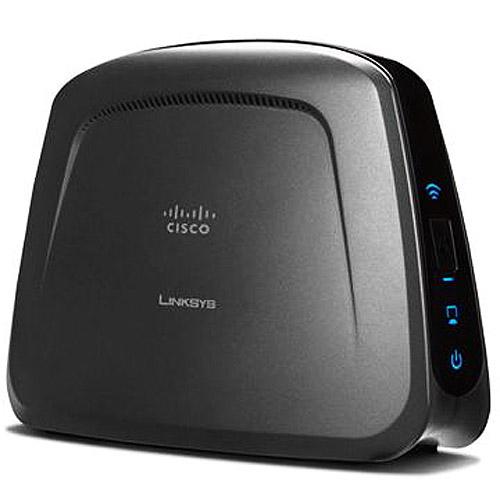 Connect WET610n to the router with the Ethernet cable. Press and hold the reset button on wet610n for 30 seconds. Release the reset button and wait for 30 seconds. Power cycle the bridge.
Now open the setup page of your router and go to the DHCP client table list. In this list you will find the devices connected . You will find the IP address of linksys wet610n. Note down that number because this will be the number that you need to access the setup page of wet610n.
Open the Internet browser and in the address bar type the IP address of wet610n. It will open the setup page.
Click on Wireless tab and go to Wireless Network site survey. Select your SSID from the list and try to connect. If it is a secured then enter the key/password. It will connect to the network.
Now disconnect the Ethernet cable from the bridge and power cycle it. Now try to ping the IP address of the WET610N.
If you are not able to find IP address of your bridge in the DHCP client table of your router then you can try another way to access the setup page.
Connect WET610N to the Ethernet port on your computer. Press and hold the reset button for 30 seconds. Release the reset button and wait for 30 seconds. Power cycle it.
Now open the Internet browser on your computer and in the address bat type http://169.254.1.250. Log on to the setup page and try to connect to the wireless network.
Comments are closed.
24 Comments
EsterDay
6th Jul 2012 - 5:41 amNot able to setup my Linksys WET610N wireless bridge. Tried many times with many different methods. I can not open the setup page of the device. The router is not assigning the IP address and I can not open the page using 169.254.1.250. Not sure what to do? Did reset many times.
JessicaRF4
5th Mar 2012 - 11:44 amThe IP address of Linksys WET610N is 169.254.1.250 . I tried to access the page with this IP address but nothing is opening. I had this devices working before but somehow it stopped working. Is there aby other way to access the page or install it?
SimondsDT
8th Feb 2012 - 5:34 amIf you are not able to access the setup page of Linksys WET610N using 169.254.1.250 then connect the WET to the router. Reset it and power cycle the router and bridge. Open the setup page of the router and check the DHCP table. You may find the IP address in the list.
Angel Puente
4th Feb 2012 - 6:30 amI have WET610N runnig fine like Bridge connected a single device port, but question is, I have a second device only with wireless connection, so Could I have connected this second wireless device associated to WET610N via wireless.
Thaks in advanced
NicholousJR
4th Feb 2012 - 6:04 am169.254.1.250 is the default IP address of Linksys wireless bridge WET610N.However when I try to open the setup page, it does not open anything. I tried to reset many times. Connected my laptop with the Ethernet cable. changed the IP address on the laptop too.
SimondFRT
31st Jan 2012 - 12:02 pm169.254.1.250 is the IP address of WET610N wireless bridge. I was able to open the setup page using this number. I connected my computer with the Ethernet cable. Did reset the device. Assigned a static IP address on my computer with the default gateway 169.254.1.250. OPened the Internet browser and in the address bar typed in 169.254.1.250…Booom…It opened the setup page. Then I changed the IP address to get it in my network.
JWatson5
7th Dec 2011 - 11:42 amI have Linksys WET610N and it is not working. I have been using this for more than 2 years without any problem. It is connected to my play station. But somehow I am not able to play games now. I am not sure whether it is router problem?
nandiniDash1
18th Nov 2011 - 8:10 amThanks for the help. I was trying to reconfigure my Linksys WET610N wireless bridge with the new E4200. Your technician helped me to setup ,y bridge with the play station and it is now working just superb…
SamanthaFRed4
30th Oct 2011 - 6:20 amThanks for your help. Your technician helped me to install my router and wireless network. The support is very good.
JimW24
12th Oct 2011 - 9:41 amI have a brand new one and I can not set it up wireless N router.
jasonGR
22nd Sep 2011 - 12:17 pmI can not setup WET610N with my play station. My play station does not have wi-fi and that is why I bought WET610N. I did run CD and it was successful. But when I connect it to the play station, it does not pick any IP address. What could be the reason?
Sachijag4
18th Sep 2011 - 4:56 amThanks for your help. Your technician helped me to configure my old Linksys WET610N wireless bridge manually. It was very good experience. He guided me properly on chat.
GabrielaA453
16th Sep 2011 - 1:43 pmWET610N bridge works great with N series wireless routers. I am using this bridge with WRT600N and getting good connection. I had to upgrade firmware on both the devices. I have my DVR system connected with the bridge.
MckennyJ876
12th Sep 2011 - 10:27 amI think this WET610N bridge works fine with play station and other gaming devices.
NeilH567
2nd Sep 2011 - 7:52 pmI was trying to configure my bridge with the new E3000 router. I am not sure about manual settings. How do I retrieve the settings of my router. I has WET54G before with the old WRT54G router. I recently upgraded to the N series.
AmarSingh12
30th Aug 2011 - 8:54 pmYou are right Chris. WES610N has 4 Ethernet ports where you can connect 4 different devices to get Wi-Fi signal. I think if you want you can also attach a switch and increase the number of ports.
Chris
29th Aug 2011 - 5:10 pmThe Linksys WES610N is the newer bridge with 4 Ethernet ports.
AmarSingh12
28th Aug 2011 - 1:13 pmI think Linksys has new wireless bridge which has 4 Ethernet ports. So that you can connect more than 4 devices.
admin
3rd Aug 2011 - 10:32 amThis device has only one Ethernet port on it. What if you want to connect more than one device to the wireless network?
Let’s consider that you have one play station, one xbox and two desktops in one room, close to each other. Your router is in a different room and sending signals. Now you don’t need to buy 4 different bridges for all the devices. You can simply buy one Linksys Wireless bridge WET610N along with 5 port or 8 port Ethernet switch.
You can connect all your devices to the switch with the Ethernet cable and then connect the switch to the bridge. In this way all the devices will be able to access the wireless network.
JenifferN
1st Aug 2011 - 12:14 pmI was looking for the steps on how to setup bridge with my E3000. I was able to setup with the help of your technician. I upgraded the firmware on both E3000 and the bridge.
Amanda
29th Jul 2011 - 10:37 pmI was trying to connect my play station to the bridge and in the process I reset my router. Now I am not able to reconfigure it. I don’t have CD for the wireless router and the bridge.
MarkG
26th Jul 2011 - 2:17 pmthanks for your help. I was just trying to setup my WET610N. The technician was very good and helpful. He called me immediately and fixed my issue. You saved my money.
AnthonyJ
23rd Jul 2011 - 1:36 pmThanks for the support. It was very good experience. The technician was very good and easy to understand. finally I was able to connect my WET610N to the Internet.
AndrewJ
14th Jun 2011 - 5:30 pmI have Linksys WET610N bridge that I want to connect to the BluRay player. I also have linksysE3000 . How do I setup WET610n. I do not have the CD.