Linksys wireless camera WVC54G, WVC54GC, WVC54GCA
- April 21, 2011
- by
- admin
Easy steps to set up the wireless camera WVC54G, WVC54GC, WVC54GCA.
Step 1 : Check the wireless settings of your network.
First make sure that you have all the settings of your wireless network. If you are not sure about the settings then you will need to open the set up page of the router and check all the settings. Connect one computer to the port 1 of the router and check the IP address of the computer. Use the default gateway to open the set up page . For example the IP address of the router is 192.168.1.1 then use that number to access the set up. Check the name SSID, the type of security ( WEP, WPA, WPA2). If your wireless network is secured then you will need the network key or passphrase.
Easy steps to check wireless settings of your router?
Step 2: Open the setup page of Linksys WVC54GC, WVC54G, WVC54GCA.
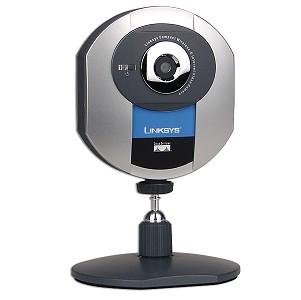 The default IP address of the Linksys camera is 192.168.1.115. If your router IP address is 192.168.1.XXX , then connect the WVC to the Ethernet port of the router. Look at the third number in the bot the IP addresses. In this example the third number is 1. So both the IP addresses are in the same range. Open the set up page of the linksys WVC and change the wireless settings of WVC54g. Now disconnect the WVC from the router and power cycle the camera. Try to ping the camera IP address. If you get the replies, then the settings are correct and it is working. Now on your computer open the Internet browser and type the IP address of the WVC. At the top you will see the option “ View Camera”. If you click on it, you will be to see your Linksys wireless camera.
If your router IP address is 192.168.2.1 and the default IP address of WVC is 192.168.1.115 then both the IP addresses are in the different IP address range. In this case you will need to connect the WVC to one of your computer. Assign a static IP address on the computer 192.168.1.10 and default gateway 192.168.1.115. Now open the set up page of the camera and change the settings of the WVC. Change the IP address of the WVC for example 192.168.2.115. Then disconnect the camera from the computer and power cycle the camera. Remove the static IP address of the computer and try to ping the camera’s new IP address. If you get the replies then all the settings are correct.
Step 3: View the camera on the Internet.
To view the camera on the Internet, you will need to open the port for WVC on the router. Generally Linksys camera works on the port 1024. You will need to forward the port 1024 for the IP address of your WVC. Go to the options tab on the setup page and enable the alternate web access port. Now check the Internet IP address on the router. You can use that number to see the camera on the Internet. Consider the Internet IP address is 68.69.x.y ( x and y may be any number ). Now to view the camera on the Internet, open the Internet browser and in the address bar type the number http://69.69.x.y:1024 and hit enter.
If you have DSL Internet service provider, make sure that you have public Internet IP address and not the private one. If it is private then you will need to convert the modem into the bridge or PPPOE mode. You can call the Internet service provider and convert the modem into PPPOE mode. Get the user name and password for the PPPOE connection.
You will be able to see your camera from anywhere in the world.
Fix Home Network
19 Comments
JerseyFN7
7th Dec 2011 - 11:56 amI have WVC54G wireless camera which is somehow not working. I was able to see the video but now I can not. I tried to reset and reconfigure it. I can see the image only when it is wired to the router. As soon as I disconnect the cable I lose the camera. It must be the issue with the Wifi settings.
AnAgenTA43
1st Dec 2011 - 4:36 amWant to upgrade firmware of my WVC54GC and WVC54GCA. How do I upgrade firmware?
AmritAK54
24th Nov 2011 - 4:47 amWhere can I find manual for WVC54GC and WVC54GCA. I had the Cd but now I lost it and I want to setup these cameras with my new N router.
AkkiJB3
18th Nov 2011 - 8:16 amWhich one is good among WVC54G, WVC54GC or WVC80N? I am planning to buy one for my home.
SantaBarber6
12th Oct 2011 - 9:53 amI had many problems with my WVC54GC before upgrading the firmware on it. Got it working fine after upgrade and hard reset.
SantyDesh67
18th Sep 2011 - 5:08 amWireless on my WVC54GC is not working properly. the connection is dropping sometimes. I had to reset and reinstall WVC54GC on my computer agaig and again. How can I improve the wireless ? The other wi-fi devices are working fine.
GabrielaA453
16th Sep 2011 - 1:54 pmI am trying to connect WVC54GC to the wireless network. I can see the camera when it is wired to the router but not when wireless. I also want to watch it from outside. What settings do I need to change?
alex
12th Sep 2011 - 8:03 pmso if someone has my camera ip adress they can view my camera?? how can i put a password on it??
MckennyJ876
12th Sep 2011 - 10:38 amI have WVC54G which is dropping the connection automatically. I already upgraded the firmware but still having the same problem. It might be the issue with the router. What settings do I need to check on my router?
Agustin127
26th Aug 2011 - 2:03 amI have been trying to install my old WVC54GC but not able to connect. I think I am not missing the correct password. How do I check the settings. I have E3000 router.
JerryB
1st Aug 2011 - 12:04 pmI was trying to connect WVC54G with the new E1000. I did upgrade the firmware and then reconfigure the WVC54G as well as E1000 also.
RandyS
23rd Jul 2011 - 1:33 pmThanks for the support. It was very good experience. The technician was very good and easy to understand. finally I was able to connect my linksys wireless camera WVC54GC to the Internet. I was able to see it in the Local network but not on the Internet.
RebeccaR
21st Jul 2011 - 1:35 pmI was trying to configure my old Linksys camera WVC54G with the E3000. While doing so I messed up with my E3000 and entire network stopped working.
Thanks for your help. The online technician was very good. I was able to understand the steps to setup my E3000. He was very good and patient with me. I am not technically good when it comes to computers. But thanks any ways. It was very good experience. Now I am happy with all my computers online at a time. The WVC54G is also working fine.
MichelleK
14th Jun 2011 - 5:44 pmI am trying to setup a brand new WVC80N camera with the old wireless WRT54G. I do not have the CD. How do I set it up manually?
AllenL
17th May 2011 - 6:15 amWVC54G camera is not working. I have Linksys E4200. I just bought it new. I can connect all my computers to the new E4200. But not sure how to connect Linksys WVC54G manually. It was working before with the old WRT54G but at that time I installed it with the CD. Now I do not have CD.
AmandaJ
5th May 2011 - 6:50 amThanks for your help ! The technician was very nice and helped me in a correct manner. I also upgraded the firmware on WRT120N. I Was trying to connect my Linksys wireless camera WVC54GCA. It was working before and all of a sudden it stopped working. I had another camera WVC54GC which is working. I have WRT120N which is working on all the computers.
AndersonJ
26th Apr 2011 - 7:09 pmI was trying to connect my Linksys wireless WVC54GCA to my new E1000. My E1000 is working and I can access the Internet on all my computers and Xbox too. When I run the software, it is not finding the WVC54GCA. Right now it is wired to the router. What could be the reason.
JustinK
23rd Apr 2011 - 1:08 amI just bought a new Linksys E3000 and now I am trying to connect my WVC54GC to the network. How do I do this.
John H
27th Jun 2011 - 10:30 amDid you figure out how to do this when using WPA security? I am having the same issue.